eID integration
In this article
Belgian companies that need to identify every visitor reliably (industrial sites, government buildings, hospitals, secured logistics) can use the official Belgian eID card to sign in to Vizito. Instead of typing their name and address on the kiosk, the visitor places their identity card on a Bluetooth card reader, and the relevant fields are filled in automatically from the chip. The visitor still confirms the data on screen before completing check-in, so they keep full control over what is submitted.
Currently Vizito supports the usage of Belgian eID cards for signing in and out on iPads. Support is built into the iPadOS kiosk app and works with the Zetes Sipiro M BT reader over Bluetooth, so there is no extra cable on the desk.
Fields read from the card
The following supported default fields are supported for capture from the eID card:
- First name
- Last name
- Address
- Zip code
- City
- Photo
Vizito only reads what is strictly needed to identify the visitor. The national register number, the card number and any other sensitive data on the chip are intentionally ignored, in line with our GDPR/AVG approach. The photo is shown briefly during check-in so the receptionist can verify identity, and it is then stored together with the visit log under the same retention policy as the rest of the visitor data.
Supported hardware
Supported hardware can be purchased directly.
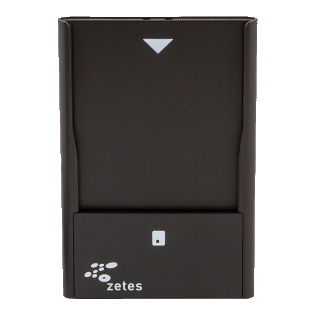
We currently support the following devices manufactured by Zetes.
|  |
|
Sipiro M BT 4.0 bluetooth
The Sipiro M BT is a battery-powered Bluetooth 4.0 card reader. It pairs with the iPad in a few seconds, charges over USB-C and is small enough to sit unobtrusively on the reception desk. One reader can serve multiple iPads; you only need to pair it with the device that will read the card. If you operate several reception desks, order one reader per desk so visitors do not have to wait.
Which documents can be scanned?
Only the Belgian eID card, read from its chip through the Sipiro M BT reader on an iPad. Vizito has no scanner for passports, driving licences, residence permits or the identity cards of other countries: there is no camera-based document scanning and no reading of the machine-readable zone of a passport.
If you need to record an identity document for visitors without a Belgian eID, the options are:
- Take a photo of the visitor at sign in. Switch on “Take visitor photo” on the “Photo” tab of the visit type. The photo is stored with the visit, shown in the “Visitor details” window of the visitor log, attached to the host’s notification email and available on the badge: see Add placeholders.
- Ask for the document number with a sign-in field. Add a “Text” field such as “ID number” to the visit type, as “Mandatory” or “Optional”, and the visitor types it on the tablet. Or give it the status “Hidden”: the visitor does not see it, your receptionist checks the document and fills in the number from the backoffice. See Sign-in field configuration and Add visitor notes.
There is no field type for uploading a scan or a photo of a document. Sign-in fields are text, checkbox, list, yes/no, number and date.
A document number is personal data. Under GDPR/AVG you need a reason to collect it, and you should set data retention so that it is removed again: see Privacy settings.
If you would like to integrate other national eID schemes (Dutch, French, German, Italian) into your visitor management workflow, please reach out so we can discuss your requirements.