Sign out a visitor from the backoffice
In this article
A visitor who leaves without signing out stays on the emergency list and in the “TODAY VISITORS CURRENT” figure for the rest of the day, and the visit stays open in the visitor log until somebody signs them out. You can do that from the backoffice in three places, for one visitor or for many at once, and you set the sign-out time yourself.
From the dashboard
The dashboard is the quickest route for a visitor who just left.
-
Open the Vizito backoffice. The dashboard opens first; “Dashboard” in the left menu brings you back to it.
-
Find the visitor in “Latest activities” and click their name. The “Visitor details” window opens.
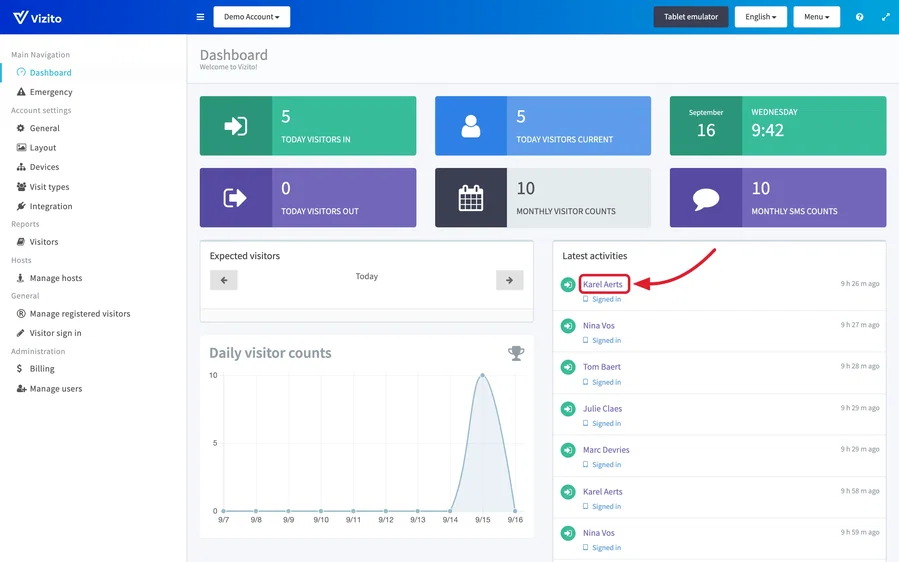
-
Click “Manual sign out”. “Visitor details” closes and the window “Manually sign out a visitor.” opens. Nobody is signed out yet.
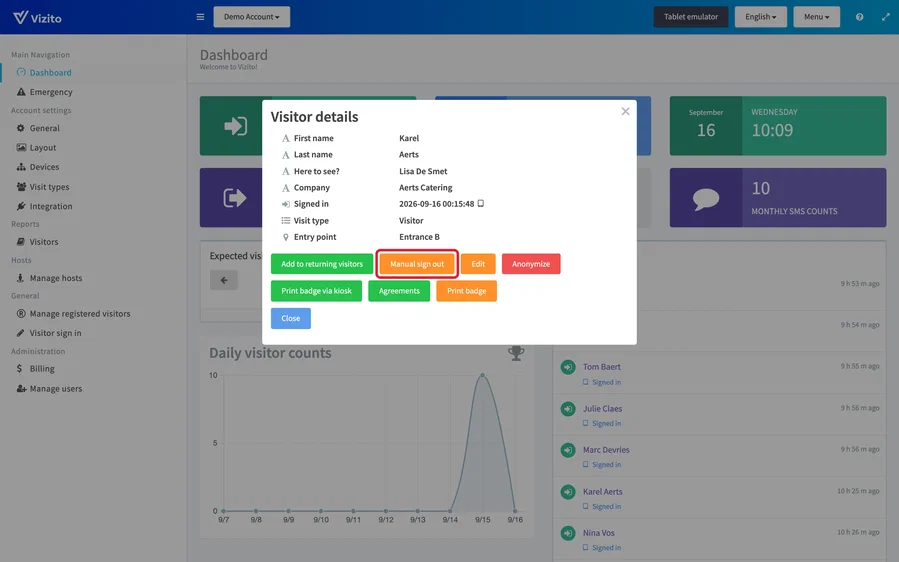
-
Check the field under “Determine the signed out date and time (default: now).”. It holds the current date and time; change it to the time the visitor actually left if that was earlier. Then click “Sign out”. “Cancel” closes the window and leaves the visitor signed in.
The “TODAY VISITORS CURRENT” widget at the top of the dashboard opens the visitor log filtered to the visitors who signed in today and are still inside, which is the list to work through at the end of the day.
From the visitor log
-
Select “Reports” > “Visitors” in the left menu.
-
Find the visitor. “Today visitors current” shows who signed in today and is still signed in. A visitor who forgot to sign out on an earlier day is not in that list: look for a row with an empty “Signed out” column in the full list, or filter on the name.
-
Click the row of the visitor. In the “Visitor details” window, click “Manual sign out”. The button only exists while the visitor is signed in.
-
In the window “Manually sign out a visitor.”, set the date and time the visitor left (1) and click “Sign out” (2).
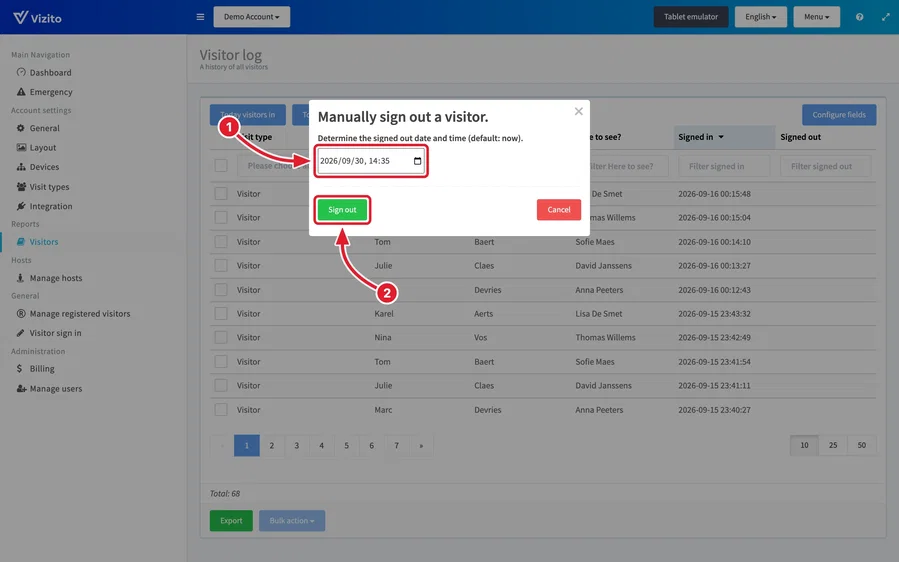
See Visitor log for everything else on that page.
Several visitors at once
- In the visitor log, tick the checkbox at the start of every row you want to sign out. For today’s visitors, “Today visitors current” first keeps the list short.
- Click “Bulk action” under the list and choose “Sign out”. The window “Manually sign out a visitor.” opens.
- Set the date and time and click “Sign out”.
Every visitor you ticked gets the same sign-out time, the one in the field.
Sign-in and sign-out times
You set the sign-out time once, in the window above, so enter the time the visitor actually left. After that it is fixed: a visitor who is signed out has no “Manual sign out” button, and the sign-out time cannot be changed. The sign-in time cannot be edited at all, not by an administrator either. “Edit” in the “Visitor details” window only changes the fields you added to the visit type yourself, such as a note. See Add visitor notes.
Visitors from an earlier day
A visit stays open in the visitor log until somebody signs it out, and “Manual sign out” works however long ago the visitor signed in. What stops after the day of sign-in is everything that lists who is present: from the next day the visitor is no longer in the sign-out list on the tablet, under “Today visitors current” or on the emergency list.
If your visitors stay overnight, raise “Number of days you’ll be able to sign out after signing in” under “Account settings” > “General” > “Advanced settings”. Those lists then look back that many days. See Advanced settings.
Let Vizito do it
- Automatic sign out closes every open visit of a visit type at a time you set, every day. See Automatic sign out.
- Sign-out reminders email the host after a set time with a one-click sign-out button. See “Enable signout reminders” in Advanced settings.
- Visitors sign themselves out at the tablet with “Sign Out”, by scanning their QR code, or on their phone with the contactless code. See Sign-in links and QR codes explained.
Who can sign visitors out
Among the built-in roles, a Receptionist, a Local admin and a Global admin get “Manual sign out” and the “Sign out” bulk action. A Security guard or an Employee sees the visitor but not the button. See User management and user roles.
A custom role can sign visitors out when it holds the privilege “Edit visitors, sign them out, reprint badges” under “Visitor logbook”. Add “Open the dashboard” if its users should also do it from the dashboard.