Oct 15, 2026
Who Is on Site Right Now? An HSE Manager’s Guide to On-Site Visibility
In this article, we look at who is responsible for visitor data when you outsource your reception or facility management, what your data processing agreement with the FM provider should cover, and how to keep your visitor log and evacuation lists in order when you change providers.

Many companies outsource their reception, their security or their entire facility management (FM). The external staff on the front desk then often work in your visitor management system (VMS). But outsourcing your reception does not mean outsourcing responsibility for your visitor log.
Under the GDPR, there is a clear line between the data controller and the data processor. When you outsource your reception, your organization stays the data controller and the FM provider becomes the data processor. That is why you need a data processing agreement. It sets out who has access, which security measures apply and what happens to the data when the contract ends.
So what should that agreement cover? What happens to your visitor log when you part ways with your FM provider? And how do you keep evacuation lists accurate when a different temp is on the desk every week? In this article, we explain how to split the responsibilities and stay in control of your visitor data.
With outsourced reception, an external provider runs your front desk day to day. Often this is part of a wider outsourced facility management contract that also covers security or other services. External staff then work at your reception, and the FM provider takes care of rotas, cover for sickness and holidays, and supervision of the receptionists.
None of this moves responsibility for your visitor log to the provider. If your organization decides why visitors are registered, which details you collect and how long you keep them, the legal responsibility stays with you. The fact that external receptionists do the actual signing in does not change that.
The GDPR makes a distinction here between the data controller and the data processor. Each role comes with its own obligations. In the next section, we look at what that means for you and your FM provider.
The difference comes down to one question: who decides why and how personal data is processed? Article 4(7) and (8) of the GDPR define both roles. In short:
When you outsource your reception, you are usually the data controller and the FM provider that staffs the desk is the data processor. You decide, for example, which visitor details are needed, what they are used for and when they are deleted. The external receptionists put those decisions into practice.
This split determines what each party has to do and what each party is liable for. Here is an overview:
| Data controller | Data processor | |
|---|---|---|
| Role | Decides on the purpose and essential means of the processing | Processes data on behalf of the controller |
| Decisions | Decides which data is needed, who has access and how long data is kept | Follows the instructions and makes practical choices within those limits |
| Obligations | Makes sure there is a valid legal basis, transparency, data minimization and appropriate security | Provides appropriate security and confidentiality, and helps with requests from data subjects |
| Data processing agreement | Only uses processors that offer sufficient guarantees, and puts the required terms in writing | Sticks to the agreement and meets its own legal obligations |
| Data breaches | Decides whether the supervisory authority and the people affected must be notified | Reports any data breach to the controller |
| Liability | Can be held liable for damage caused by processing that breaches the GDPR | Can be held liable for ignoring instructions or failing its obligations as a processor |
In most cases, the company that outsources its reception is the data controller and the FM provider running the desk is the processor. But the roles depend on what each party actually does and decides, not on what the contract calls them. For some processing, an FM provider can be a data controller in its own right.
A few examples:

When an external reception company handles your visitor data, you need to put the arrangements in writing in a data processing agreement (DPA). It sets out how the provider must handle the data and what each party is responsible for.
Article 28(3) of the GDPR lists what the agreement must include:
The agreement describes:
The processor may only handle visitor data on the documented instructions of the controller. It cannot decide to use the data for its own purposes.
The instructions explain how the processor must handle visitor data. That could cover the visitor management system it must use, which details may be recorded, which retention periods apply, who has access and whether data may be transferred outside the European Economic Area (EEA).
If the processor believes an instruction breaches the GDPR or other privacy law, it must tell the controller straight away.
The processor must make sure that everyone authorized to handle the visitor data is bound by confidentiality, either through a confidentiality agreement or a legal duty.
That includes temporary receptionists and stand-ins who have access to the visitor log.
The agreement must require the processor to take appropriate technical and organizational security measures. For visitor registration, think of personal user accounts, restricted access rights and encryption.
It also covers restoring access to the data after an incident and testing security regularly.
The agreement states whether the processor may bring in sub-processors. It can only do so with the controller’s prior written authorization.
That authorization can be specific, for a named sub-processor, or general. With general authorization, the processor must tell you about any new sub-processor in advance, so you have the chance to object.
Sub-processors must be held to the same obligations by contract. If a sub-processor fails to meet them, the original processor remains liable to you.
Visitors can ask to exercise their privacy rights, such as the right to access, correct or delete their data.
The agreement must set out how the processor helps you deal with these requests. For example, by passing requests on to you and by finding, correcting or deleting data when you ask.
The processor must also help you with the security of the processing, with data breaches and, where needed, with a data protection impact assessment (DPIA) and prior consultation with the supervisory authority.
Agree on how incidents are reported, too. The processor must notify you of a data breach without undue delay after becoming aware of it.
When the service ends, the processor must delete or return the visitor data, whichever the controller chooses. Any existing copies must also be deleted, unless the law requires them to be kept. Make this concrete: in what format is the data handed over, by when, and how does the provider confirm that everything else has been deleted?
The processor must make available all the information you need to check that it meets its obligations. It must also allow and contribute to audits and inspections carried out by you or an auditor you appoint.
Agree on how an audit is requested and carried out, without limiting your right to audit more than necessary.
The GDPR does not say whose system the visitor log should live in. In practice, it is best kept in a visitor management system (VMS) on an account that you manage yourself. External receptionists then get their own user profiles, with only the access they need to do their job.
That way, as the data controller, you stay in control of the settings, the access rights and the visitor data. If you change FM provider, you simply remove access for the outgoing staff and set up the new team, without moving your visitor log to another system.
Does the FM provider use its own system or account? Then agree in writing how you keep access to the data, how it can be exported and how it is returned or deleted when the contract ends.
One more thing: if you use a cloud-based VMS, you will usually need a data processing agreement with the VMS provider as well. The provider stores visitor data on your behalf, so it is a data processor too.
The data processing agreement should spell out what happens to the visitor log when the contract ends. As the data controller, you decide whether the processor returns it or deletes it. Any existing copies must also be deleted, unless the law requires them to be kept.
The practical steps depend on how you register visitors today. The infographic below shows what you and your provider need to do in each scenario.
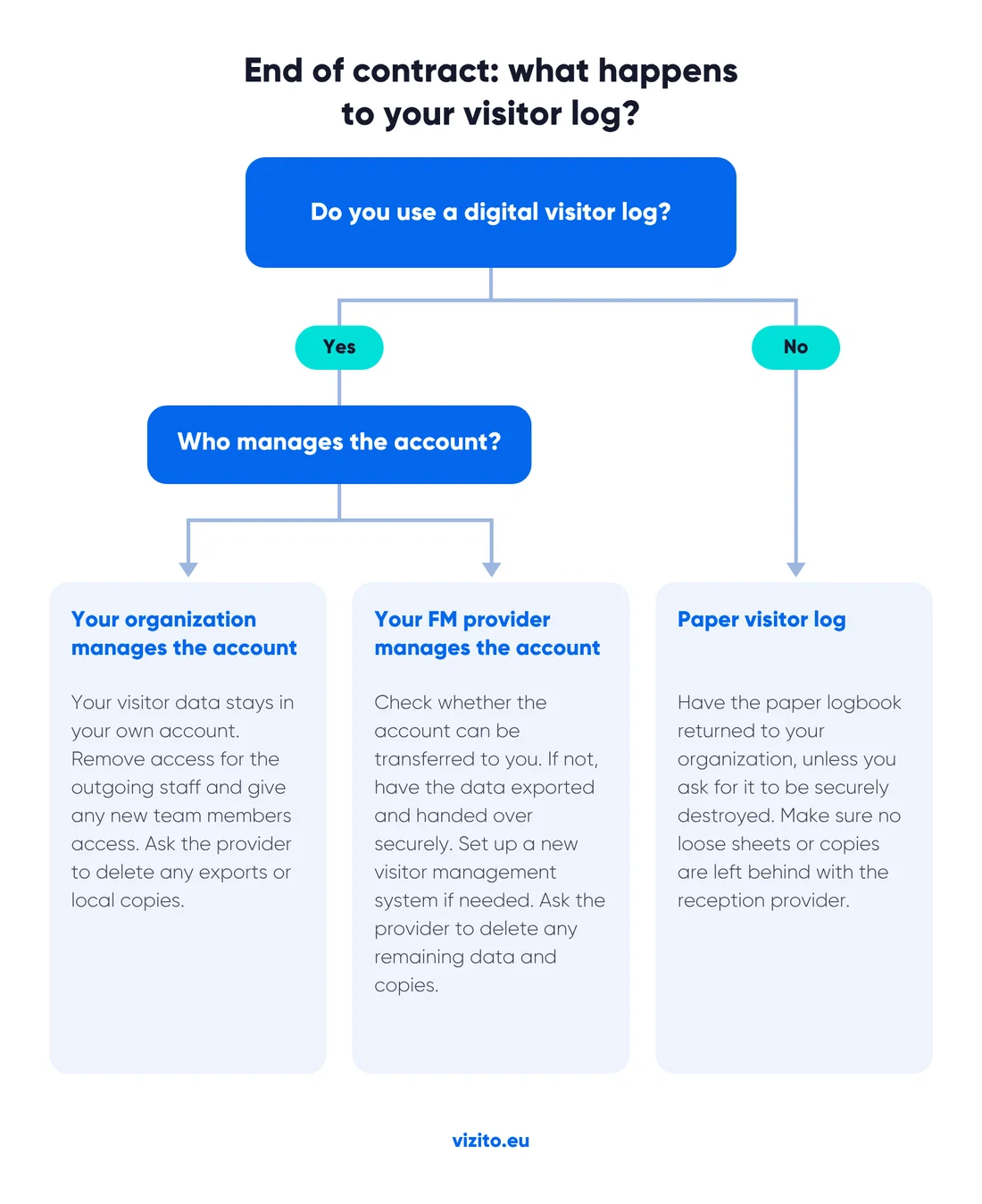
Whatever your situation, keep these steps in mind when the contract ends:
When you outsource your reception, you may see a new face behind the desk now and then. Or the staff may change every day or every shift. In that case, you need a watertight way to produce evacuation lists. If there is a fire, the list has to be right, no matter who is on the desk that week.
The most reliable way to know who is in the building at any moment is to go digital. A digital visitor management system records who has signed in and out. So you always have an up-to-date attendance list, whoever is on the front desk.
With changing reception staff, whoever is on the desk when an emergency happens must know how to export the current list, and must have the rights to do it. Build this into your emergency plan and make sure everyone gets the right training and instructions.
A few practical tips:
An external provider can take over the day-to-day work at your reception, but not the responsibility for your visitor data. Your organization remains the data controller. You decide which data is recorded, who can see it and how long it is kept. A solid data processing agreement with your FM provider puts those arrangements in writing, including what happens when the contract ends.
A digital visitor management system turns those arrangements into everyday practice. When your organization manages the account, you control the settings and retention periods, give external receptionists their own profile with only the rights they need, and remove their access the moment you change provider. Your visitor log stays in your own system, and you always have an up-to-date attendance list, whoever is behind the desk.
Want to see how Vizito keeps you in control of your visitor log, even with an external reception provider? Try Vizito free for 14 days or book a demo.
 Hosted in Europe
 ISO 27001 Certified
 GDPR compliant
 249+ reviews
 No credit card required
Our chat could not load
A content blocker or privacy extension is blocking client.crisp.chat, the service that runs our chat. Allow that address and try again, or reach us another way.
Contact us instead